-1.png)
G-Cloud 15 Explained: What UK Councils Need to Know
Quick answer: G-Cloud 15 is the UK government's newest cloud procurement framework. It went live in August 2026, and it lets councils buy .
.svg)
Say hello to Schedule View, a very cool update for you Partner and PartnerPro Hosts. This feature actually affects the guest side, but makes your spaces more easy to book! 😎
Schedule View works like this: whenever a guest looks at your host page with all of your space listings, they will be able to check out important information about your spaces without even going into their respective pages! All they need to do is click the calendar icon on the top right corner of your spaces' images...
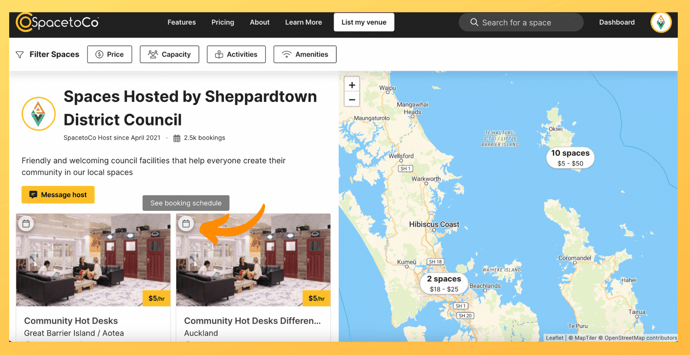
...and a window pops up with the spaces' price per hour, minimum booking time and max occupancy, plus a calendar they can toggle to check out current availability! If they're happy with what they see, they can easily click the 'Book Now' button, which will lead them to the actual space page to continue the booking process.
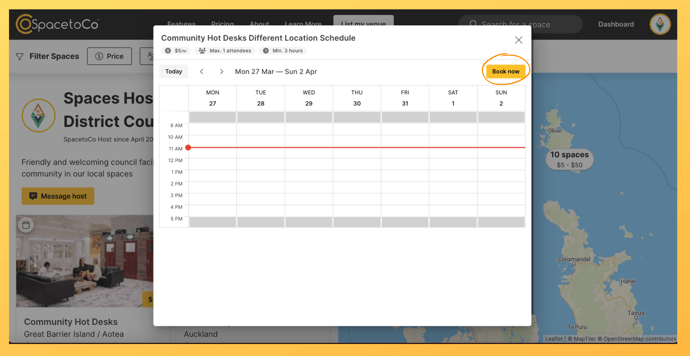
Check out the video below to see Schedule View in action!
.svg)
Book a personalised demo with a local team member




© 2026 SpacetoCo PTY LTD | All Rights Reserved | hello@spacetoco.com | AU: (08) 6102 1191 | UK: 0330 818 2437 | NZ: (09) 887 4698
©️ 2025 SpacetoCo PTY LTD | All Rights Reserved |
AU: (08) 6102 1191 | NZ: (09) 887 4698